Getting Started
Use the Datablist API to manage collection data, enrich your own records, or generate new data with sources.
Send requests to https://api.datablist.com using HTTPS. Request and response bodies use JSON. For authenticated endpoints, we recommend sending your Personal API Key in x-api-key. Access tokens in Authorization are an optional alternative.
API endpoints
| API | Endpoint |
|---|---|
| Personal API Key exchange (optional) | POST https://api.datablist.com/v1/account/token |
| Datastore | https://api.datablist.com/v1/data |
| Enrichment catalog and tasks | https://api.datablist.com/v1/enrichments |
| Source catalog and tasks | https://api.datablist.com/v1/sources |
| Credit balance | GET https://api.datablist.com/v1/credits/balance |
Authenticated requests accept a Personal API Key or a Bearer access token, as described below.
To check your connection, read the enrichment or source catalog. You do not need to start a paid task.
Data
Datablist organizes your stored data into workspaces, collections, and items. A collection's properties define its columns, such as a company name, email address, or score. You can add properties as your data changes.
Enrichment and source tasks can run without creating any of these resources. They accept JSON and return results to your application.
Data Structure
A workspace contains collections. A data collection contains items (rows); a folder organizes other collections.

For example, a workspace might contain a Contacts collection and a folder of other collections:
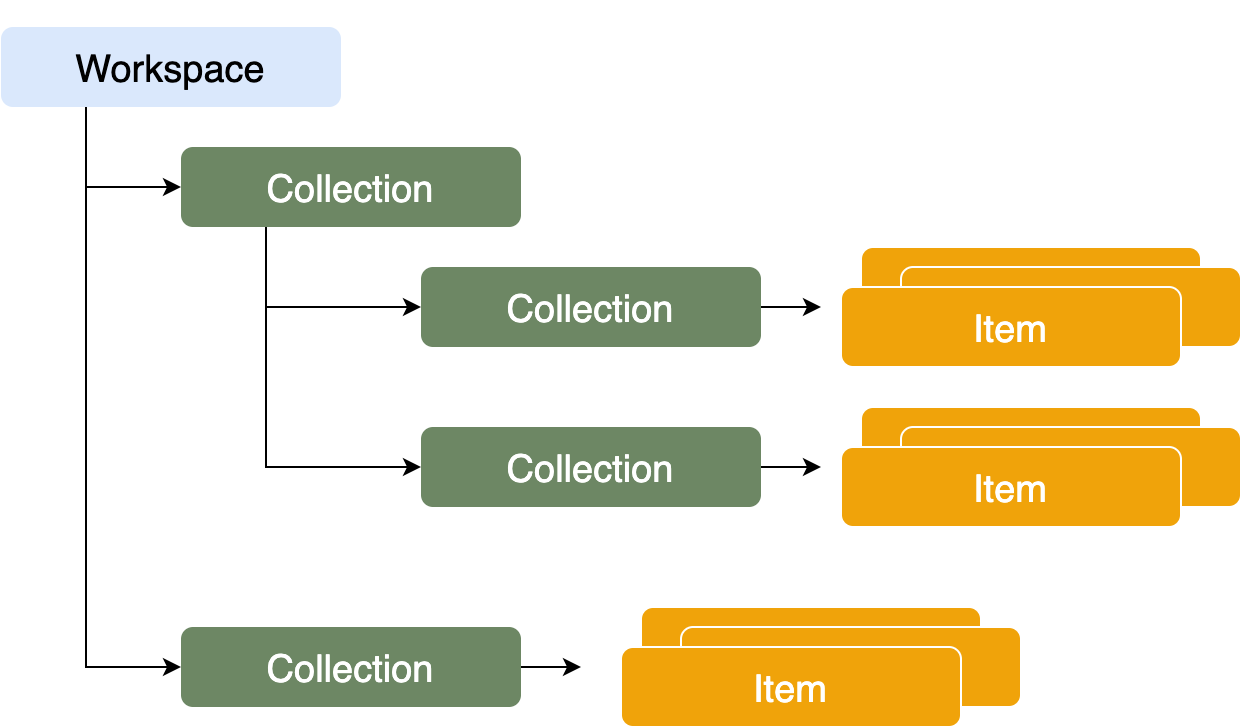
Workspace
A workspace groups collections you share with a team. Use separate workspaces when different teams need access to different collections.
Collection
A collection is a table of items with the same data type, such as Person. Set itemsType when you create it.
A collection with itemsType: "Collection" is a folder instead. Folders can contain collections or other folders.
All the items in a collection share the same data type.
For example, a Contact collection accepts Contact items, not Transaction items.
Read the collection reference.
Item
An item is one row in a collection, such as a contact or company.
The collection's properties define the fields you can send for each item. Each property has a display name, an API key, and a value type such as Text, Number, Date, or Datetime.
Authentication
Personal API Key (recommended)
For most integrations, use a Personal API Key. Datablist handles token renewal for you, so you do not need to manage access tokens.
Create a Personal API Key on the API page in your Datablist account. Send it directly on authenticated requests:
X-API-Key: YOUR_PERSONAL_API_KEY
New keys use <userId>-<accountId>-<secret>-2. The user ID in the key omits
the auth0| prefix. Access-token responses still return the full user ID.
For example, this fictional key shows the format:
exampleuser-exampleaccount-EXAMPLE_TOKEN_NOT_VALID-2:::note Already have an API key?
Older keys use auth0|<userId>:<accountId>:<secret>:1. They remain supported.
Keep using your existing key exactly as generated; you do not need to replace
or reformat it.
:::
You do not need an access token to exchange your key or read the public catalogs. Here is an authenticated call:
import requests
url = "https://api.datablist.com/v1/data/{{endpoint}}"
headers = {    "Accept": "application/json",    "X-API-Key": "<personal-api-key>"}
response = requests.get(url, headers=headers)
print(response.text)
Header names are case-insensitive. Datablist exchanges your key and renews the cached token on the next request when less than 30 minutes remain. During a temporary renewal outage, an existing unexpired token may still be used; a rejected key never uses this fallback. Deleting a key prevents future exchanges, but cached tokens may remain usable until renewal or expiry, potentially nearly 24 hours. To rotate a key, replace the saved header value.
Optionally, if you want to manage tokens yourself, use Authorization: Bearer ACCESS_TOKEN from the exchange below.
In that mode, you manage replacement after the token's 24-hour expiration.
Send only one credential header: both together return 400 AmbiguousCredentials.
Keep credentials out of URLs, logs, and public code.
Access tokens (optional)
Skip this step when using x-api-key. Exchange your key only if your application needs to manage access tokens itself.
To get an access token, call POST https://api.datablist.com/v1/account/token.
See the Get an access token reference
for request fields, response attributes, and examples in five languages.
import requests
url = "https://api.datablist.com/v1/account/token"
headers = {    "Accept": "application/json",    "Content-Type": "application/json"}
payload = {    "apiKey": "{{your Personal API Key}}"}
response = requests.post(url, headers=headers, json=payload)
print(response.text)
If your Personal API Key is valid, the response will be:
{ "access_token": "eyJ0eXAiOiJKV1QiLCJhbGciOiJIUzI1NiJ9.LKDSLFKASLDFKLASDFLKyMTQzNjcsImFjY291bnQiOiJjOGQ5MDZiN2RkNjI0MThkYTNlNDJkYWVmMDlkMDJhZCIsInNjb3BlIjoiYWRtaW4ifQ.SDKFLSDFKAOSDKLFKXCLV", "token_type": "Bearer", "expires_in": 86400, "expires_at": 1679214367, "account_id": "SLKFLSDKFLASOJIWEJ", "user_id": "auth0|9283494JDFKSDSD4", "scope": [ "admin" ]}Use the returned access_token in the Authorization header for subsequent calls.
Requests and Responses format
The following formats apply to datastore endpoints under /v1/data.
Enrichment and source tasks have their own request and response schemas,
documented in their endpoint references.
Use Accept: application/json for JSON responses. When sending a body, also use Content-Type: application/json.
Datastore endpoints also support JSON-LD with application/ld+json. The response's Content-Type follows your Accept header.
Requests
A request with a body looks like:
import requests
url = "https://api.datablist.com/v1/data/{{endpoint}}"
headers = {    "Accept": "application/json",    "Content-Type": "application/json",    "X-API-Key": "<personal-api-key>"}
payload = {    "field1": "value1",    "field2": "value2"}
response = requests.post(url, headers=headers, json=payload)
print(response.text)
Responses
{ "@context": {...}, "@id": "{{ALPHANUMERIC_STRING}}", "@type": "Workspace|Collection|Item", "createdAt": "2020-07-08T09:31:10.303945", "updatedAt": "2020-07-08T09:31:10.303945", ...}{ "@context": {...}, "data": [{ "@id": "{{ALPHANUMERIC_STRING}}", "@type": "Workspace|Collection|Item", "createdAt": "2020-07-08T09:31:10.303945", "updatedAt": "2020-07-08T09:31:10.303945", ... },{ "@id": "{{ALPHANUMERIC_STRING}}", "@type": "Space|Collection|Item", "createdAt": "2020-07-08T09:31:10.303945", "updatedAt": "2020-07-08T09:31:10.303945", ... }]}HTTP Status Codes
HTTP statuses indicate the outcome of a request. A 2xx response is successful;
202 means asynchronous work was accepted, not that execution has finished.
4xx responses indicate a rejected request, and 5xx responses indicate an
API failure.
| HTTP Status Code | Description |
|---|---|
| 200 | Success. |
| 201 | Object created. |
| 202 | Asynchronous task accepted. |
| 204 | Success with empty response. This is used for update (PUT, PATCH) and delete requests. |
| 400 | Bad Request |
| 401 | Unauthorized. Access Token is missing or invalid. |
| 403 | Forbidden. Missing permission or disallowed request. |
| 404 | The resource could not be found. |
| 405 | Method Not Allowed for this endpoint. |
| 409 | Conflict, duplicate active task, or results not yet ready. |
| 413 | Request body is too large. |
| 415 | Unsupported request content type. |
| 422 | Invalid task inputs or settings. |
| 429 | Request rate limit or active-task limit reached. |
| 500 | Unexpected server error. |
| 502, 503, 504 | Service unavailable or temporary service/timeout failure. |
See Rate limits and errors for API throttling, JSON error codes, and safe retry guidance.
Rate limits and errors
When a request to https://api.datablist.com fails, use the HTTP status and
JSON code to decide what to do next. Keep X-Request-ID for support.
API rate limits
The API applies the following throttling to Enrichments API and Sources API requests:
| Operation | Requests per 60-second window |
|---|---|
Create an enrichment task: POST /v1/enrichments/tasks | 10 |
Create a source task: POST /v1/sources/tasks | 120 |
| List the catalog or get a schema (no authentication required) | 120 per operation and IP address |
| Each other authenticated Enrichments or Sources operation: list tasks, get task status, stop a task, get results, or get enrichment inputs | 120 per operation |
| Automatic Personal API Key token exchanges across protected routes | 60 per IP address |
Limits apply per Datablist account and operation. For example, checking the status of several enrichment tasks shares one allowance; reading their results uses another. Sources have separate allowances. Using another API key for the same account does not reset them.
Automatic exchanges have their own IP-based allowance. Reusing a cached token does not count against it. This guard is best-effort, not a globally shared allowance, and does not replace account/operation limits.
Each window starts with its first counted request and lasts 60 seconds; it does not reset at a clock-minute boundary. Authenticated requests can count even when later request validation or processing fails.
Treat these numbers as limits to stay within, not guaranteed request allowances. They apply to enrichment and source requests. Datastore, token exchange, and credit balance requests can have other endpoint-specific limits.
When throttled
The API returns HTTP 429 with code: "RateLimitExceeded" and a
Retry-After header containing the number of seconds to wait:
HTTP/1.1 429 Too Many RequestsContent-Type: application/jsonCache-Control: no-storeRetry-After: 15X-Request-ID: req_example
{  "http_status": 429,  "code": "RateLimitExceeded",  "description": "Too many requests."}
Wait at least Retry-After seconds before trying again. Check task status less often or send fewer requests at once. If throttling continues, increase the delay between attempts and set a retry limit. A request rejected for throttling is not executed.
A 429 ActiveTaskLimitExceeded has a different cause: too many tasks are active. Wait for a task to become completed, failed, or stopped before creating another. See
Enrichment task limits and
Source task limits.
Error JSON format
API errors use this JSON envelope:
{ "http_status": 401, "code": "InvalidToken", "description": "A valid Bearer access token is required."}| Field | Type | Meaning |
|---|---|---|
http_status | Integer | Matches the response's HTTP status. |
code | String | Case-sensitive error identifier for programmatic handling. |
description | String | Human-readable explanation; do not match its wording in application logic. |
trace_id | String or null, when present | Optional support reference. Not present on every error. |
Some errors include trace_id or endpoint-specific details alongside the
three core fields:
{ "http_status": 409, "code": "ResultsNotReady", "description": "The task results are not ready.", "trace_id": null}Allow extra fields when parsing errors. Network failures have no HTTP response, and some failures can return a non-JSON body; check the content type and status before parsing JSON.
Response headers
| Header | Meaning |
|---|---|
X-Request-ID | Correlation reference on successful and error API responses. It is not a JSON field. Include it when contacting support. |
Retry-After | Seconds to wait before retrying when supplied by the API. |
Allow | Supported HTTP methods on a 405 response. |
WWW-Authenticate | Bearer on bearer-authentication 401 errors. |
Cache-Control | no-store on common API error responses. |
Common HTTP statuses and error codes
These codes describe common API errors. Individual endpoints can return additional codes with the same HTTP status.
| HTTP status | JSON code | Meaning and next step |
|---|---|---|
| 400 | InvalidPath | Malformed or unsafe URL path. Use the documented endpoint path and URL encoding. |
| 400 | AmbiguousCredentials | Send either X-API-Key or Authorization, not both. |
| 401 | InvalidAPIKey | Personal API Key is malformed, invalid, or deleted. Check or replace the key. |
| 401 | InvalidToken | Missing, malformed, expired, or invalid Bearer access token. Get a new token through the token exchange. |
| 403 | Forbidden | Token lacks the required scope or is not permitted on this route. Check the endpoint's authentication requirements. |
| 403 | ForbiddenOrigin | Browser origin is not allowed to call the API. Use a supported integration or make the call from your server. |
| 403 | ForbiddenCorsRequest | Browser preflight requests a method or headers that are not allowed. |
| 404 | NotFound | No available public route matches the URL. Check the path and API version. |
| 405 | MethodNotAllowed | Route exists, but does not support this method. Check Allow. |
| 413 | PayloadTooLarge | Body exceeds the route's request-size limit. Reduce or split the payload. |
| 415 | UnsupportedMediaType | Request requires JSON. Send Content-Type: application/json. |
| 429 | RateLimitExceeded | Request counter exhausted. Honor Retry-After and slow down. |
| 500 | ConfigurationError | API configuration problem. Contact support with X-Request-ID. |
| 502 | UpstreamUnavailable | The API is temporarily unavailable. Reads can be retried with bounded backoff; writes need extra care. |
| 502 | InvalidTokenExchangeResponse | Token exchange returned an unusable response. Contact support with X-Request-ID. |
| 503 | TokenExchangeUnavailable | Token exchange is temporarily unavailable and no valid cached token can be used. Honor Retry-After. |
Endpoint errors and safe retries
Endpoint validation and authorization can return additional errors. Examples include:
| HTTP status | Example JSON code | Meaning |
|---|---|---|
| 400 | DataValidationError, IntegrityError | Invalid datastore payload or conflicting object identity. Correct the request. |
| 403 | PermissionDenied | The authenticated caller cannot access the resource. |
| 409 | DuplicateApiTask | An active task already uses the supplied uniqueId. Find the existing task. |
| 409 | ResultsNotReady | Task results are not yet available. Poll the task status before trying again. |
| 422 | InvalidApiTask, UnsupportedEnrichment | Invalid task inputs/settings or unavailable tool. Check its current schema. |
| 429 | ActiveTaskLimitExceeded | Account has reached its active-task limit. Wait for work to finish. |
| 503 | ApiTaskDispatchFailed | Task could not be fully submitted for execution. Inspect task history before submitting again. |
Endpoint authentication can also return 401, missing resources 404, and
oversized bodies 413. Unexpected API failures can return 500, and
temporary failures or timeouts can return 502, 503, or 504.
Refer to each endpoint's response reference and the
task error guide for details.
For temporary network failures or 502/503/504, retry reads with increasing delays and a retry limit. Fix invalid requests or permissions before trying again. For an expired-token 401, get a new token first.
Do not blindly repeat a write after a timeout or lost response: it may already
have succeeded. Task creation can incur credits. Save the returned task ID and
check both enrichment and source task histories for your uniqueId before
retrying an ambiguous creation request. See
safe task retries.
Get, List, Create, Update, Delete - Single operation or bulk
Datastore endpoints use HTTP verbs for CRUD operations:
| HTTP Verb | Description | Return |
|---|---|---|
| POST | Create an object | Return HTTP status 201 with a {"@id": "object_id"} response and a Location header pointing to the newly created resource |
| GET | Retrieve object(s) | Return HTTP status 200. |
| PATCH | Partial update | Return HTTP status 204 (empty response) |
| PUT | Full Update | Return HTTP status 204 (empty response) |
| DELETE | Delete object | Return HTTP status 204 (empty response) |
Create
You can supply createdAt and @id when creating an object, or let the API generate them. An existing @id returns 400 IntegrityError.
A successful request returns 201 and the new object's URL in the Location header.
Update
updatedAt is updated on any PUT or PATCH request.
A successful update returns 204 with no response body.
Bulk
Use the item /batch endpoints to change several items in one request. See the bulk item operations.
For example, creating 10,000 items in batches of 200 takes 50 requests. You can send several requests at once, but start with a small number and reduce it if requests slow down or fail. Respect the endpoint's request-size limits.

For item queries, see Filtering and Ordering in the Items reference.